
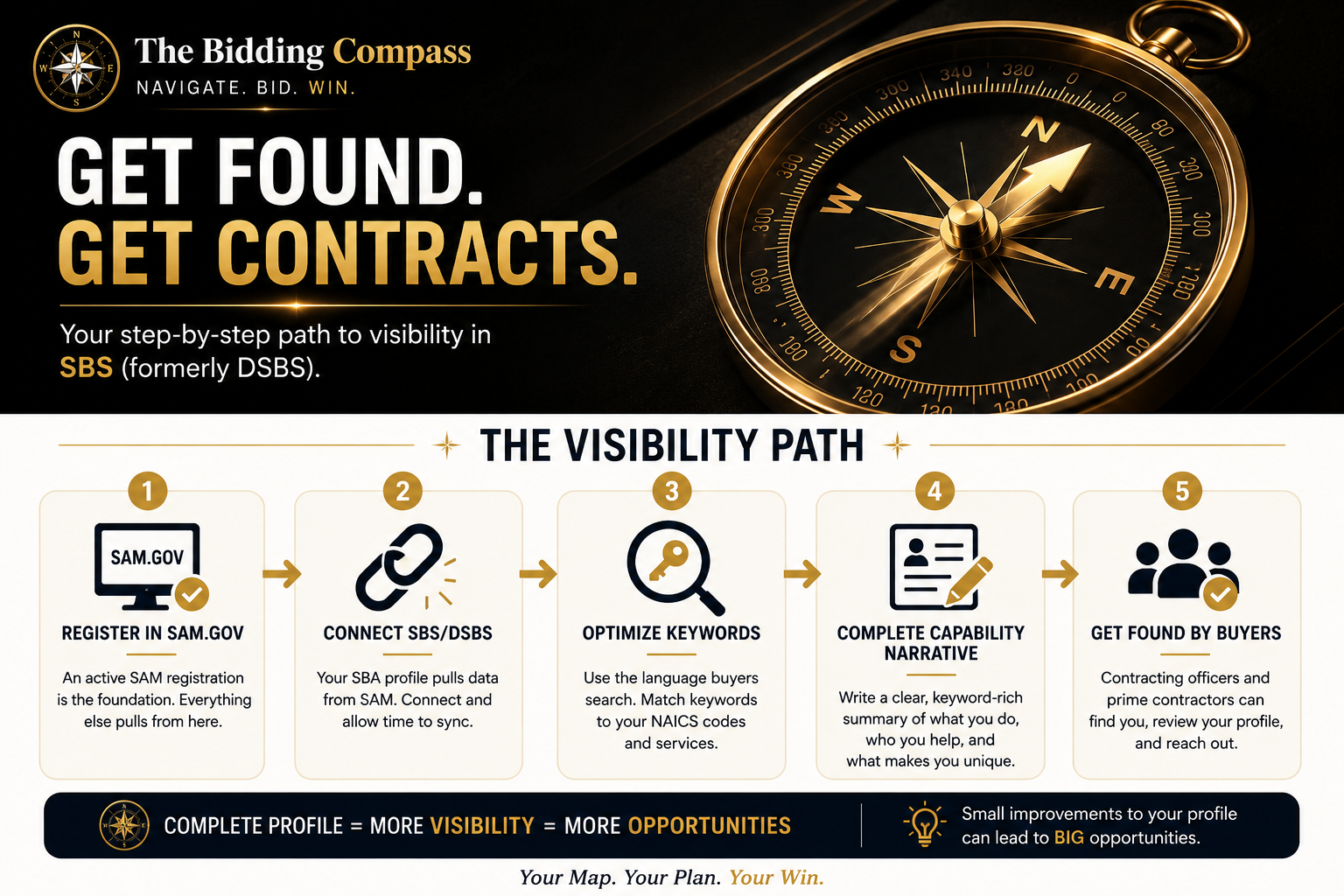
Many small businesses think that once they register in SAM.gov, buyers will magically find them.
Unfortunately, that's not how it works.
SAM gets you into the system. Your SBA Small Business Search (SBS) profile — formerly known as DSBS (Dynamic Small Business Search) — helps contracting officers, agency buyers, and prime contractors understand who you are and what you do.
If your profile is incomplete, missing keywords, or disconnected from your SAM registration, you may be invisible even though you're technically registered.
That's a brutal place to be. You did the hard work. You registered. You waited. And nobody's calling.
This guide is going to fix that.
Quick note on the name change: The SBA recently renamed DSBS to Small Business Search (SBS). You'll still see both terms used constantly — by contractors, by agencies, and even by contracting officers who've been doing this for years. Don't let the name confusion trip you up. They're the same database. We'll use both terms throughout this guide so you're comfortable with either one.
What Is SBS (Formerly DSBS)?
SBS (Small Business Search, formerly DSBS) is a free, searchable database maintained by the Small Business Administration (SBA). It's specifically designed to help government buyers find small businesses to award contracts to.
Think of it as a yellow pages for government contracting — except instead of someone picking up a phone book, a contracting officer types in what they're looking for and your profile either shows up or it doesn't.
Why does it exist?
The federal government is legally required to meet small business contracting goals. That means agencies need to find qualified small businesses, not just hope they appear. SBS exists to make that matching process easier.
Who uses it?
- Federal contracting officers conducting market research before issuing a solicitation
- Agency small business offices sourcing vendors for set-aside contracts
- Prime contractors looking for qualified small business subcontractors
- Program managers and acquisition teams reviewing vendor capabilities
How does it support market research?
Before an agency publishes a contract, contracting officers are often required to do market research — meaning they look around and ask: “Are there capable small businesses out there who can do this work?”
SBS is one of the first places they look. If your profile is strong, you show up. If it's weak or missing, they move on to someone else before you ever knew there was an opportunity.
The bottom line: SAM.gov proves you're registered. SBS proves you're relevant. You need both working together.
How Contracting Officers Find Small Businesses
Here's something most new contractors don't realize: the government is often looking for you. The challenge is making sure they can actually find you when they do.
Here's how contracting officers typically search for small businesses:
Market Research
Before publishing a solicitation, agencies must document that they looked for qualified vendors. That research often includes searches in SBS, GSA databases, and sometimes even LinkedIn. If your business matches what they're looking for, your profile becomes evidence that a set-aside is viable.
Set-Aside Contract Reviews
When an agency wants to award a contract as a small business set-aside (meaning only small businesses can compete), they need to verify there are at least two or more qualified small businesses that can do the work. They search SBS to find them.
If your profile doesn't show up for the right NAICS codes and keywords, you won't be counted — and that set-aside may go full-and-open instead.
Capability Reviews
Sometimes a contracting officer wants to understand what a business does before reaching out. Your SBS profile is often the first place they look. A strong capabilities narrative can be what gets you a call. A vague one gets you passed over.
Keyword Searches
SBS allows searches by keyword, industry, location, certifications, and NAICS codes. Buyers type in what they need — like “facility maintenance Virginia veteran-owned” — and results populate based on profile content.
If those keywords aren't in your profile, you don't appear. Simple as that.
NAICS Code Searches
Every solicitation has a primary NAICS code. When contracting officers search SBS, they often filter by NAICS. This is why choosing the right codes matters — and why having too many random codes actually works against you.
Example: A cleaning company registered under NAICS 561720 (Janitorial Services) will show up when a contracting officer searches for janitorial vendors. If they didn't include that code, or buried it under 30 others with no narrative, they may not surface at all.
The Step Most Businesses Miss — Connecting SBS to SAM.gov
This is where a lot of businesses fall through the cracks. And it's almost never their fault — nobody told them this part.
Here's how the connection works
Your SBS profile pulls its foundation from your SAM.gov registration. Your legal business name, address, UEI, CAGE code, and NAICS codes all flow from SAM into SBS automatically.
But “automatically” doesn't mean instantly. And it definitely doesn't mean completely.
What you need to do
- Confirm your SAM.gov registration is active. Log into SAM.gov and check your registration status. If it's expired or pending, SBS won't reflect accurate information. Renew SAM annually — the system will prompt you, but don't wait until the last minute.
- Access your SBA profile. Go to sbs.sba.gov and search for your business. If it's there, claim it. If it's not, you may need to create or sync it. The SBA's website has step-by-step instructions for accessing your profile once your SAM registration is active.
- Complete your profile beyond what SAM provides. SAM gives SBS the skeleton. You add the muscle. That means writing your capabilities narrative, adding keywords, listing your certifications, and describing what you actually do in plain English. None of that happens automatically.
- Allow time for synchronization. After updates in SAM, it can take several days for changes to reflect in SBS. Don't panic if you don't see changes immediately. Check back in 48–72 hours.
Registered in SAM but not showing up in SBS?
This is one of the most common visibility problems new contractors face. It usually means one of three things: your SAM registration recently lapsed (or is still processing), your profile hasn't been completed beyond the SAM sync, or there's a mismatch in your business information. Start by verifying your SAM status first — that fixes the problem about 80% of the time.
Troubleshooting: If your profile still isn't appearing
- Double-check that your SAM registration is active (not pending or expired)
- Confirm your UEI is correct in both systems
- Search SBS by your UEI instead of your business name — name variations can cause mismatches
- Contact the SBA's answer desk at 1-800-827-5722 if the issue persists
- Give it 3–5 business days after any SAM update before troubleshooting further
Why Nobody Is Finding You
Let's be direct. If you've been registered for months and haven't had a contracting officer reach out, there's usually a reason. Here are the most common ones.
Incomplete Profile
An SBS profile with missing sections is like a resume with blank experience fields. Buyers move on. If your capabilities narrative is empty, your keywords are missing, or your certifications aren't listed, you look like a placeholder — not a real business.
Weak Capability Narrative
“We provide quality services.” isn't a capability narrative. It tells a buyer nothing. It doesn't include what you do, where you do it, who you do it for, or what makes you worth calling. More on this below.
Wrong or Missing Keywords
Buyers search in plain language. If a contracting officer is looking for someone to handle electrical work on federal facilities in Georgia, they're not searching for “solutions provider.” They're searching for words like electrical contractor, facility maintenance, federal buildings, licensed electrician, Georgia. If those words aren't in your profile, you're not in those results.
Poor NAICS Selection
Registering under too many NAICS codes with no clear focus dilutes your profile. It signals to buyers that you'll take anything, which doesn't inspire confidence. Pick the codes that actually reflect your work. Quality over quantity.
Outdated Information
An old address, expired certifications, or a phone number that goes to voicemail sends the wrong signal. Buyers want to work with vendors who are organized and current. An outdated profile makes you look inactive.
Missing Certifications
If you're SDVOSB, WOSB, 8(a), or HUBZone, those certifications need to be on your profile and current. Contracting officers specifically filter by certification when they're building a set-aside. If yours isn't listed, you won't show up in those searches — even if you're fully qualified.
Your 15-Minute SBS Visibility Checkup
Pull up your SBS profile right now and run through this checklist. This is one of the highest-value things you can do for your business today — and it costs nothing but 15 minutes.
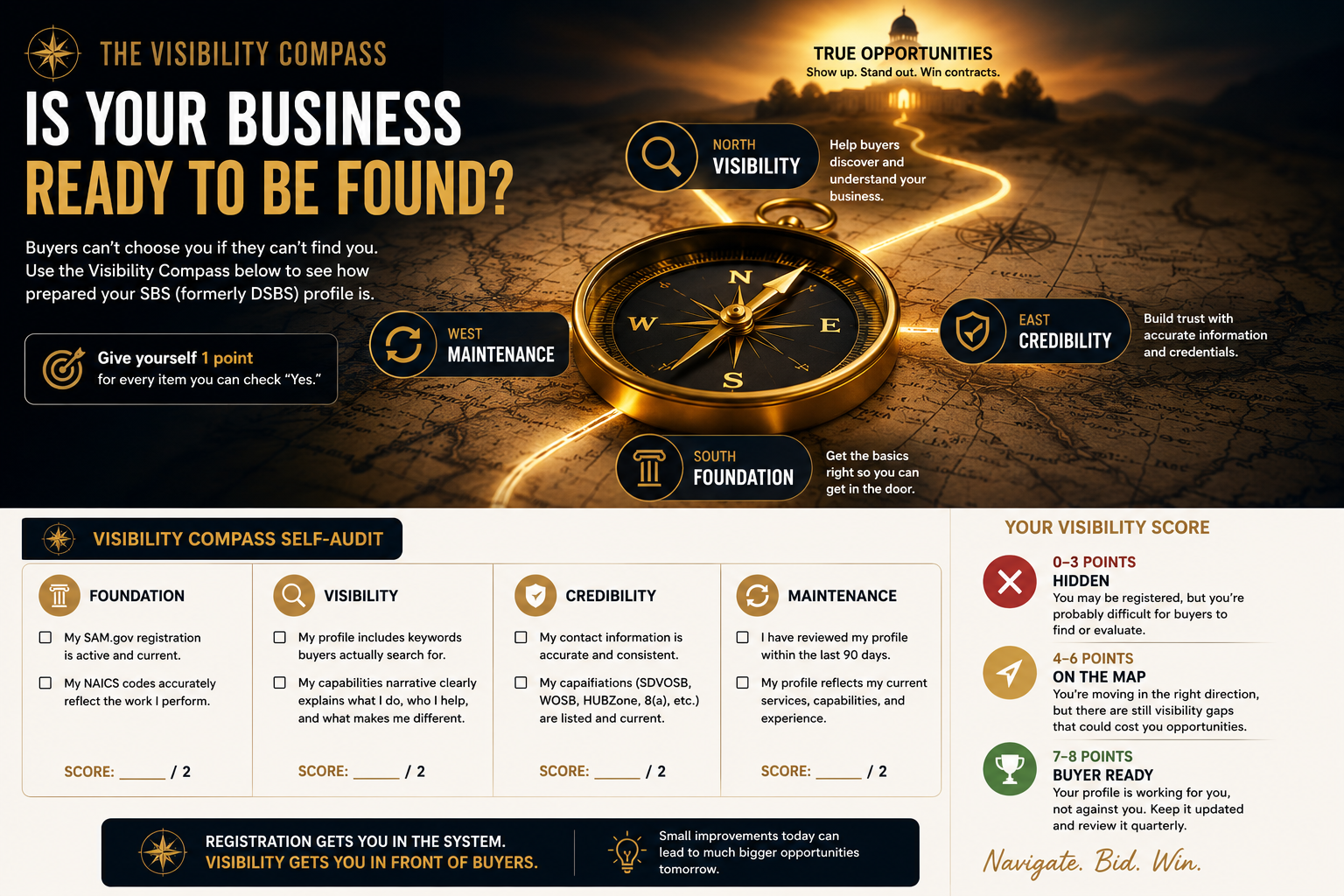
Visibility Score
How to Write a Strong Capabilities Narrative
This is where most small businesses leave money on the table. The capabilities narrative is your one shot to tell a buyer — in your own words — exactly what you do, where you do it, and why you're qualified.
It doesn't need to be long. But it needs to be specific.
Why the narrative matters
When a contracting officer searches SBS and finds your profile, the capabilities narrative is often the first thing they read. It answers the question: “Is this business actually capable of doing what I need?”
A vague answer gets you ignored. A specific, keyword-rich answer gets you a call.
What buyers look for
- Specificity — What services do you actually provide? What industries? What types of projects?
- Location — Where are you located? What geographic areas do you serve?
- Qualifications — Licenses, certifications, experience, and credentials that are relevant
- Keywords — Words that match what they'd actually type into a search box
The keyword connection
Here's something that makes a real difference: the words in your capabilities narrative affect how your profile appears in searches. If a buyer searches “concrete repair federal facilities,” and those words appear in your narrative, you surface. If they don't, you don't.
Write for the buyer searching — not for the way you'd describe your own business at a dinner party.
Weak Example vs. Strong Example
Weak
“We provide quality construction services.”
Strong
“Veteran-owned construction company specializing in commercial renovations, facility maintenance, concrete repair, and federal construction projects throughout Florida. Licensed and insured. OSHA certified. Experienced working with GSA, Army Corps, and state agencies on projects ranging from $25,000 to $2M. Committed to on-time delivery and full regulatory compliance.”
Why the second example performs better
The weak example tells a buyer almost nothing. There's no location, no specialization, no keywords, no context for what “quality” means.
The strong example answers every question a buyer would have: What do they do? Where? For whom? At what scale? Are they qualified? It also includes natural keywords — renovations, facility maintenance, concrete repair, federal construction, Florida, veteran-owned, OSHA, GSA, Army Corps — that directly match what buyers search.
You don't need to be a writer to do this. Just answer the questions:
- What specific services do you offer?
- What types of clients or projects have you worked on?
- Where do you operate?
- What certifications, licenses, or credentials are relevant?
- What makes you a reliable choice?
Write those answers in two to four sentences and you have a capabilities narrative that actually works.
Tip for SDVOSB businesses: Lead with your certification status in the narrative. Many contracting officers filter specifically for veteran-owned businesses. If your certification is buried or missing, you may not surface in those targeted searches.
DSBS Profile Optimization Tips That Actually Matter
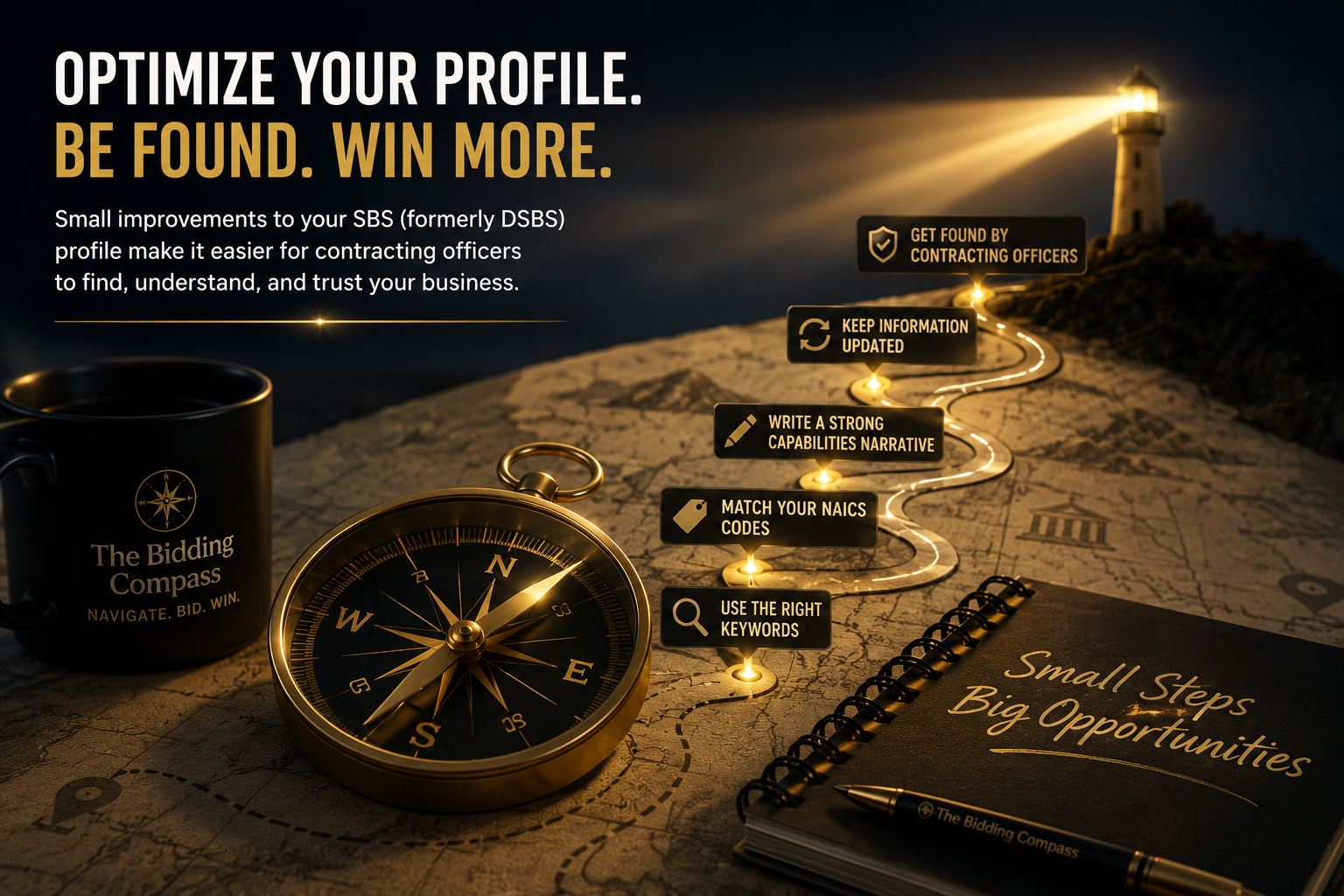
A lot of “optimization” advice online is generic and useless. Here's what actually makes a difference for SBS profiles.
Use the language buyers use — not the language you use
There's a difference between how you describe your business and how a contracting officer searches for it. A buyer looking for IT help desk support isn't searching for “technology solutions.” They're searching for “IT support,” “help desk,” “service desk,” or “desktop support.” Mirror their language.
A good shortcut: look at solicitations in your NAICS code on SAM.gov. Pay attention to the scope of work descriptions. The words they use to describe the work are the words you should include in your profile.
Match your keywords to your NAICS codes
Your NAICS codes signal your industry. Your keywords fill in the details. They should be consistent. If you're registered under NAICS 561210 (Facilities Support Services), your narrative should include keywords like facility maintenance, building operations, preventive maintenance, or whatever subset of that work you actually perform.
Mismatched keywords and NAICS codes create confusion for buyers — and for the search algorithm.
Keep your information consistent across platforms
Your business name, address, and certifications should match across SAM.gov, SBS, your website, and any agency vendor portals you're registered in. Inconsistencies raise flags during market research. Buyers want to see a business that has its documentation in order.
Review your profile quarterly
Government contracting moves slowly, but your business shouldn't sit still. Set a reminder every 90 days to review your SBS profile. Ask yourself: Does this still reflect what we do? Are certifications current? Is contact info accurate? Has anything changed about our services?
Updating SAM and DSBS profiles regularly signals to buyers that your business is active and engaged — not dormant.
Update certifications immediately when they're renewed or added
Certifications are often the primary filter in vendor searches. If your SDVOSB status renewed last month and your SBS profile still shows an old date, you may be excluded from searches that should include you. Don't wait. Update immediately.
Refresh your capabilities as your services evolve
If you've added new services, completed notable projects, or gained new experience, update your narrative to reflect it. Your profile should represent where you are now — not where you were when you first registered.
Common Questions About Getting Found
What is the difference between SAM.gov and SBS (formerly DSBS)?
SAM.gov is your registration. SBS (formerly DSBS) is your visibility.
Registering in SAM gets your business into the federal system. Your SBS profile helps contracting officers and prime contractors discover and evaluate your business during market research. Think of SAM as your registration and SBS as your business listing.
Have more questions? Check out our full FAQ page.
Why can't I find my business in SBS?
There are several common reasons:
- Your SAM registration is inactive or expired
- Your profile has not synchronized yet after a recent update
- Your information is incomplete
- You recently updated SAM.gov and changes have not appeared yet
Start by verifying your SAM registration status — that fixes the problem about 80% of the time. If you recently made changes, allow 48–72 hours before troubleshooting further. More answers on our FAQ page.
Do contracting officers actually use SBS to find small businesses?
Yes. Many contracting officers use SBS as part of their market research process when looking for qualified small businesses. A complete profile makes it easier for buyers to understand your capabilities, certifications, and experience.
The easier you are to find, the easier it is to be considered. When they do find you, your Capabilities Statement is what closes the deal. More questions? See our full FAQ.
What should I put in my SBS capabilities narrative?
Focus on specific services, certifications, and keywords buyers actually search for. Avoid vague descriptions like “We provide quality services.” Instead, clearly explain:
- What you do
- Who you serve
- Relevant certifications and licenses
- Specialized capabilities and geographic area
The goal is to help buyers quickly understand whether your business is a fit. For a full walkthrough, see our Capabilities Statement guide — the principles carry over directly. More answers on our FAQ page.
What are saved searches on SAM.gov?
Saved searches help you monitor contract opportunities that match your business without manually searching every day. You can create alerts based on NAICS codes, set-aside types, locations, and notice types.
Many successful contractors use multiple saved searches to stay informed about new opportunities. When you're ready to evaluate and respond to those opportunities, the deepRFP guide walks through how to analyze solicitations efficiently. More on SAM.gov tools in our full FAQ.
You're Now Ahead of Most Beginners
Registration alone is not enough.
You can have an active SAM.gov account, the right NAICS codes, and a legitimate business — and still be completely invisible to the buyers who need what you offer.
Your SBS profile is one of the easiest, most underused free tools in government contracting. A strong profile doesn't just help buyers find you. It starts building credibility before you ever submit a proposal.
The good news: most of your competition isn't doing this well. Incomplete profiles, missing keywords, vague narratives — that's the norm. Which means a well-built SBS profile is one of the fastest ways to stand out before you've won a single contract.
Start with your 15-minute checkup above. Fix what's missing. Write a real capabilities narrative. Review it quarterly.
Small improvements here make a real difference.
The Bidding Compass — Pointing Your Business in the Right Direction.
Your Next Step
Once Buyers Can Find You, Make Sure You're Ready to Impress Them.
A strong SBS profile gets you noticed. Your Capabilities Statement is what closes the deal. It's your one-page government contracting résumé — and the next guide gives you a fill-in-the-blank template you can use today.
Go to Guide 5: Capabilities Statement →